
Pipelines & Opportunities in Go High Level: A Complete Guide for Agencies
Pipeline Management in Go High Level: A Complete Guide for Agencies
Introduction
Every business needs a clear way to track leads from the moment they come in until they become paying clients. Without a system, opportunities slip through the cracks, follow-ups get missed, and revenue suffers.
That’s why, it's important to create and maintain pipeline and also track opportunities. It gives you a visual way to track prospects through different stages of your sales process, automate movement between stages, and measure conversion rates at every step.
In this guide, we’ll cover:
What pipelines & Opportunities are in GHL
How to set them up step by step
Best practices to keep them clean and organized
Real-world examples from agencies and SaaS businesses
What Are Pipelines in Go High Level?
A pipeline in GHL is a series of stages that represent your sales or service process. For example:
New Lead → Contacted → Booked → Proposal Sent → Closed Won/Lost Pipelines in GHL are connected to your Opportunities tab, which allows you to:
Track where every lead is in the journey
Automate movements (e.g., when an appointment is booked, move lead to Booked)
Forecast revenue based on pipeline values
Why Businesses Love Pipelines & Opportunities
📊 Transparency: Clear view of where leads are stuck
🔄 Automation: Move opportunities automatically based on triggers
⏱ Efficiency: No manual dragging between stages needed
💼 Client Reporting: Show clients how many leads moved through pipelines
Step-by-Step Setup Guide
Step 1: Create a New Pipeline
Go to Opportunities → Pipelines → Create New Pipeline.
Name your pipeline (e.g., “Agency Sales Funnel”).
Add stages (New Lead, Qualified, Booked, Won, Lost).
Step 2: Add Automation
Go to Workflows → Create Workflow.
Set trigger: Appointment Booked.
Add action: Create/Update opportunity to “Booked Stage”.
Step 3: Assign Values
Add estimated value for each opportunity.
GHL will automatically forecast your potential revenue.
Step 4: Customize Per Client
If you’re an agency with multiple clients, you can create separate pipelines per client or service type.
Best Practices for Creating High Level Pipelines
Keep pipeline stages short and clear (5–7 stages max).
Automate repetitive tasks (assigning reps, sending reminders).
Regularly clean old opportunities stuck in stages.
Use tags to track sources (FB Ads, SEO, Referrals).
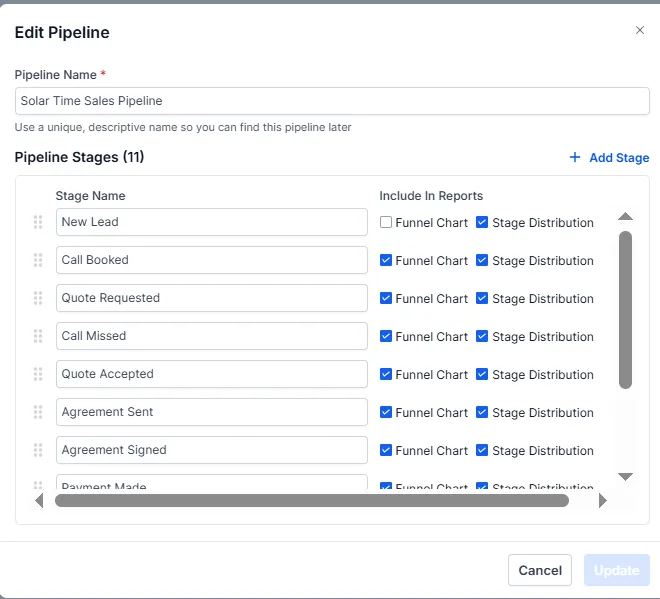
Real-World Example: Sales Pipeline in GHL for Solar Company
Lets take a case of a solar company.
Pipeline name can be "ABC (Company Name) Sales Pipeline" and pipeline stages could be
1. New Lead
2. Call Booked
3. Quote Sent
4. Agreement Signed
5. Paid
6. Installation Started
7. Installation Completed
8. Review Requested
Conclusion
Pipeline Management in GHL keeps agencies and SaaS businesses organized, efficient, and revenue-focused. By automating movements and tracking conversions, you’ll never lose sight of an opportunity again.
👉 Want us to build pipelines for your agency?
📅 Book a Free Strategy Call with HL Assistly below Or, start using Go High Level here .
HL ASSISTLY
Quick Links
Useful Links


HL ASSISTLY
Quick Links
Useful Links